

Do you want to create a Youtube Channel channel. If the answer is yes, then this is the perfect article for you. YouTube is one of the lucrative side hustles to earn some extra cash. You can make money from YouTube through the YouTube Partner Program, sponsorship, affiliate marketing, product promotion, or channel memberships.
To monetize your channel, you’ll need to get 1,000 subscribers and 4,000 viewing hours within one year. But first, you have to set up a YouTube channel. This article provides a step-by-step guide to creating a YouTube Channel.
Steps to Create a YouTube Channel
Get a Google Account
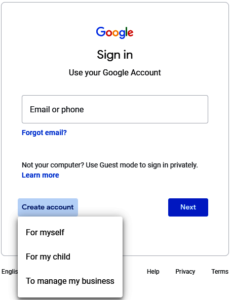
YouTube, as one of Google’s products, is accessed through your Google account. If you haven’t set up your Google account, it’s time to create one. Creating a Google account isn’t difficult. Go to Google Accounts to start the process.
Put in your details, including your name, birthday, gender, and email address. Ensure the personal info is accurate to make your account secure.
Create a YouTube Account
Once your Google account is ready, it’s time to create a YouTube account. Go to YouTube.com and click ‘Sign In.’
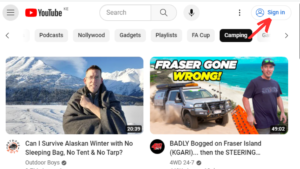
Enter your email and password for your Google account to proceed to YouTube.
Create a YouTube Channel
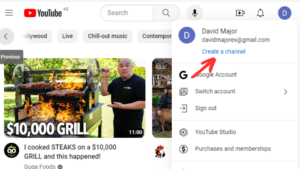
Now that you’re signed in to your YouTube account, let’s create a channel. First, click the profile picture in the top right corner. Then, click ‘Create a Channel.’ Upload a profile picture and enter the best name for your channel. Remember, creating a YouTube channel is totally free.
Customize Your Channel
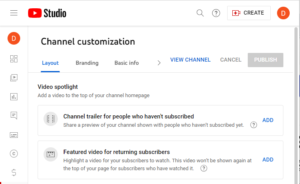
The next step involves Channel customization. Click ‘Customize channel.’ The channel customization page has three tabs: layout, branding, and basic info. Tap each tab to customize various elements as follows.
Layout: In the layout tab, you can add a channel trailer, post a featured video for your subscribers, and create sections for your homepage. But you can customize these elements once you’ve published your content.
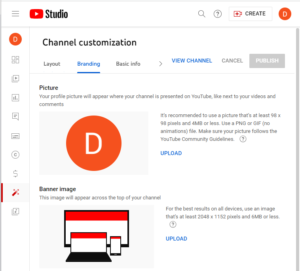
Branding: Next, click “Branding’ to customize the profile picture, banner image, and video watermark. The profile picture can be your photo or a logo. Take note of the recommended image sizes for each image. For example, the banner image has to be at least 2048 x 1152 pixels. You can use Canva to create the banner image and the video watermark.
Basic info: In this tab, you’ll fill in the ‘description’ section to inform viewers about your channel. The tab also allows you to change the channel name, change your handle, add contact info, and share external links.
Verify Your Phone Number
It’s critical to verify your phone number when setting up your channel. The verification allows you to post content longer than 15 minutes, conduct live streams, upload custom thumbnails, and appeal Content ID claims. To verify your phone number, click “settings’ and select intermediate features. Enter your phone number, and you’ll get the verification code via a text or call.
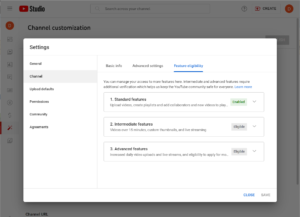
Advanced features are unlocked through video verification, uploading a valid ID, and building channel history. You can upload more content daily once you’re eligible for advanced features.
Add Your Content
Now that everything is ready, it’s time to publish your content. Click ‘Create’, just next to your profile picture. Choose ‘Upload video’ or ‘Go live.’ After uploading your video, enter the video’s details, including the title and description. Add a custom thumbnail to give your audience a quick snapshot of the video.
Getting Monetized
You’ll earn money from your videos by joining the YouTube Partner Program. To be eligible for monetization, you must attain 1,000 subscribers and 4,000 public watching hours in the last 365 days or 10 million public short views in 90 days.
Submit your application for monetization after reaching the eligibility criteria. Before monetization, YouTube will check if the channel follows the monetization policies.
Related article: Top 10 Online Jobs in Kenya in 2024
Tips to grow your channel
Here are tips to grow your channel and increase your earnings.
- Chose the best niche
- Publish high-quality content consistently
- Keep your audience engaged
- Create top-notch thumbnails for your videos
- Use the right keywords in the video titles and descriptions
- Meet the viewers’ preferences
- Encourage viewers to subscribe
- Promote your YouTube channel on social platforms
- Follow YouTube Community Guidelines